What Is New in the Current Version
The current PVZ Fusion release is the busiest the garden has ever been. Four new plants join the almanac: Frost Threepeater, Floating Chomper, Giant Spike King, and Super Gatling Gloom-shroom, and each one arrives with its own fusion paths to discover. The Alpha Diary content is complete, a Magic Brush Ma Liang drawing level adds a painterly detour, and two challenge skins, Tidal Conch and Autumn Moonlight, give challenge maps a fresh coat.
- Four new plants: Frost Threepeater, Floating Chomper, Giant Spike King, and Super Gatling Gloom-shroom
- World Map Tower Defense returns, with path-based upgrades for your plants
- Alpha Diary completed and the Magic Brush Ma Liang drawing level added
- Expanded Super Custom Levels for the built-in level editor
- Snowy Night Day 6 difficulty adjusted, plus plant balance updates and bug fixes
- A smaller game file than the previous release
What Is PVZ Fusion?
PVZ Fusion is a free fan-made tower defense game in which you plant two compatible plants on the same lawn tile and they merge into a single hybrid that keeps both parents' abilities.
Its full name is Plants vs. Zombies: Fusion, and the idea is simple to say and deep to play. A Sunflower on its own makes sun. A Peashooter on its own fires peas. Plant one on top of the other and you get a Sunshooter, a plant that fires peas while it makes sun, holding one tile and doing two jobs. Every seed slot in the garden becomes a small workshop: plants are ingredients first and defenders second, and the lawn you build by the final wave can look nothing like the lawn you started with.
The game is a standalone Unity project, not a patch for an existing install. You do not need any other Plants vs. Zombies game on your phone for it to run. It was created by the fan developer LanPiaoPiaoFly, known as Blue Fly, with a small team helping on art, animation, and code, and it first reached players through the creator's Bilibili channel. It has grown through steady updates ever since, and it is stated plainly here because it matters: this is a fan project, not an official EA or PopCap release, and it has never been sold or listed on an app store.
How Plant Fusion Works
Fusion follows one rule a child can learn and a strategist can study for months: place a plant onto a compatible plant that is already rooted, and the two become one hybrid. The hybrid inherits the attack, defense, or utility of both parents, and sometimes gains a trick neither parent had.
Peashooter + Sunflower = Sunshooter. The first recipe the Adventure tutorial teaches: peas down the lane, sun on the side, one tile doing both jobs.
Spikeweed + Wall-nut = Spike-nut. A wall that bites back, so zombies pay for every second they spend chewing.
Peashooter + Torchwood = Flame Peashooter. Peas catch fire as they pass and land as splash damage, which melts packed rows.
In PVZ Fusion, fusions stack. A hybrid can be fused again, and again, climbing six tiers from simple Common pairs through Upgraded and Advanced (Super) fusions that take three plants, up to Titan plants that occupy two tiles, Odyssey fusions built for the Odyssey modes, and rare Infusible plants that appear by chance rather than recipe. The community wiki counts more than 400 hybrid plants across those tiers, and your in-game almanac records every recipe you discover, so experimentation is never wasted.
The PVZ Fusion zombies keep pace. Hybrid zombie variants arrive tougher, faster, and in larger numbers, and some shrug off a single damage type entirely. A lawn built on one idea will eventually meet the wave that punishes it, which is why the fusion bench, not any single plant, is the real weapon.
Main Features
Every feature below grows out of the fusion idea or supports it. Nothing here needs an account, and the whole game plays offline once it is installed.
Plant fusion system
Stack two compatible plants on one tile to merge them into a hybrid with both abilities, then fuse the hybrid again to climb the tiers.
400+ hybrid plants
More than 400 fusions across six tiers, counted by the community wiki, each tracked in your in-game almanac as you discover it.
Six difficulty levels
From Easy at normal spawn rates up to Merciless and beyond at ten times the zombies, so the same lawn can be a stroll or a siege.
Gardening tools
The Gardening Glove moves a rooted plant to a new tile, Fertilizer heals and grows plants, and the Hammer clears a dense knot of zombies.
Hybrid zombies
Fused and armored zombie variants that resist single damage types and force you to mix fire, ice, and splash across your lanes.
Custom level editor
The Super Custom Level editor lets you build scenes, waves, and rules of your own and share the levels with other players.
Zen Garden
Seedlings drop from any map and grow in the Zen Garden, then your grown plants defend in Garden Defense rounds.
Free and offline
The game is free, with no in-app purchases, and every mode plays fully offline after install. No sign up stands between you and the lawn.
Community English builds
The base release is in Chinese, and community translation builds bring English menus to Android and PC, usually a step behind the newest release.
Game Modes in the Garden
Adventure teaches fusion one recipe at a time, but it is only the front lawn. The PVZ Fusion mode list is where the game's size shows.
Adventure
The main campaign. The first level teaches the Sunshooter recipe, and new plants, zombies, and fusion tiers unlock as the maps move from day lawns to night, pool, and roof gardens.
Odyssey
The flagship family: Odyssey Adventure, Survival, and Last Stand, with modifier drafting between rounds, an Odyssey Shop, and fusions that exist only here.
Challenge and Fusion Challenges
Focused stages with set problems to solve. Fusion Challenges are the gate to Advanced (Super) recipes, starting with the Cherry-bomber.
Purgatory
The extreme end of Odyssey Survival, home to the strongest zombie class in the game. Bring a finished fusion bench or do not come.
Travel
Selectable travel maps with leader routes and their own stage flow, replayable at higher difficulties for better rewards.
Mini-games
Botany crush puzzles, Minesweeper, bowling, Vasebreaker, and more short formats that borrow the fusion bench for quick sessions.
World Map Tower Defense
A path-based tower defense mode where plants earn upgrades along the route, returning in the current release after a long absence.
Zen Garden and Garden Defense
Grow seedlings that drop from any map, then field your grown plants in Garden Defense. The calmest corner of the game, and a useful one.
PVZ Fusion Screenshots
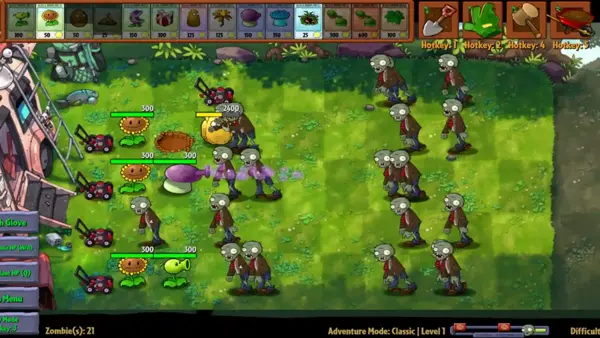
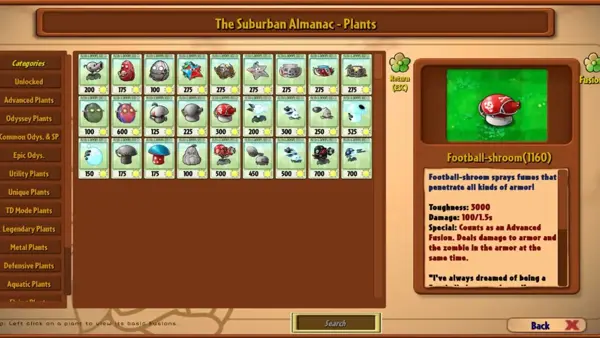
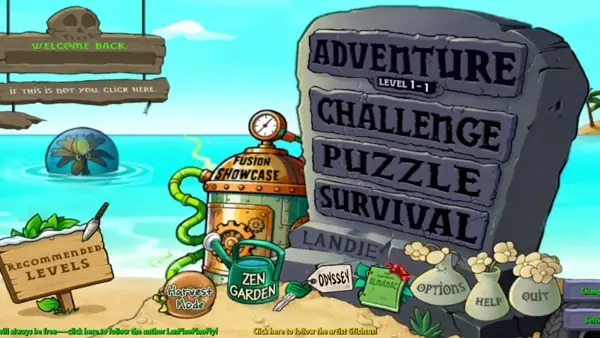
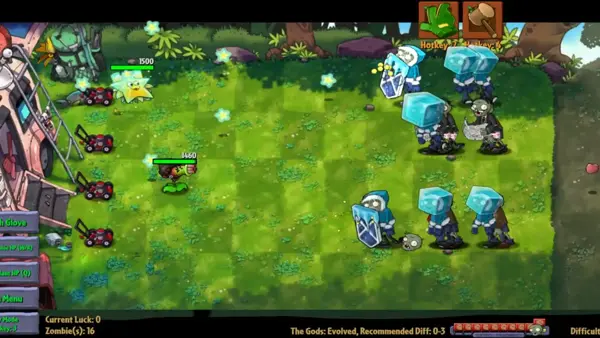
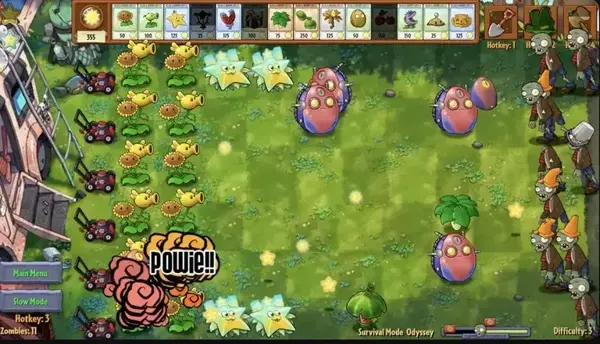
Every screenshot below is a real screenshot of the game itself: the Adventure lawn, an advanced fusion in battle, the main menu tombstone, a survival wave, and Odyssey survival. They are shown in a phone-sized carousel, exactly as captured, with no mockups and no invented screens.
Safety and Verification
Because PVZ Fusion is a fan game distributed outside app stores, where you get the file matters more than anything a badge can say. Our checks for this title follow the same bench we use for every game on this site.
- Know what the file should be. The current Android build is version 4.0.5 at about 579 MB, with the package name listed in the technical details below. A file that is far smaller, or named differently, is not this game.
- Back up your save first. Different community builds can carry different signing keys, and installing one build over another can wipe progress. Copy your save data somewhere safe before any install or update.
- Skip repacked mod menus. Copies advertising cheat menus are unofficial rebuilds by strangers. The original fan build is the one described on this page.
- Expect a sideload prompt. There is no app store listing for this game, so Android will ask you to allow installation from your browser or file manager. That prompt is normal for a fan project; granting it to a file you have not checked is the risk to avoid.
- Tested on real phones. We install and play the current build on our review bench before writing about it, checking the tutorial fusion, the almanac, Odyssey, and the Zen Garden on each handset.
How to Download and Install PVZ Fusion
Installing PVZ Fusion on Android means sideloading: you fetch the game file, give your phone permission to install it just this once, and open it. Here is the whole path, in the order a first-time player meets it.
- Free the space first. The current build needs roughly 800 MB of free room to install comfortably. Clear that space before anything else, and back up any existing PVZ Fusion save if you are updating.
- Get the file from the download page. Use the download page on this site when its link is live, and check the file name and size against the details table before you open anything.
- Allow this one install. When Android asks, allow your browser or file manager to install unknown apps. You can switch the permission back off as soon as the game is on your phone.
- Open the file and install. Tap the downloaded file, confirm the install, and wait for it to finish. A game this size can take a minute; do not lock the phone mid-install.
- Start with the tutorial. Adventure level 1 teaches the Sunshooter fusion in your first minutes. Play it before anything else, even if you know the original game well, because fusion changes every habit.
- Pick your language build. The base release is in Chinese. If you want English menus, use a community English build and accept that it may sit one release behind the newest version.
How to Update
Updating PVZ Fusion is where fan games bite, so do it in this order. First, back up your save: builds from different community sources can use different signing keys, and an install over a mismatched build can erase progress. Second, install the new build from the same source family as your current one whenever you can. Third, open the game and check the almanac and your Zen Garden before you delete any backup. If a fresh build misbehaves, the previous stable release is a reasonable place to wait; older builds stay listed in the old versions section below.
Device Compatibility
The PVZ Fusion Android build asks for Android 5.1 or higher, about 2 GB of RAM, and around 800 MB of free space for the install. Community English builds are stricter and need Android 8 or higher. On our bench the game runs on the Galaxy A55 (Android 15), Pixel 8 (Android 16), Redmi Note 13 Pro (Android 14), Infinix Note 40 Pro (Android 14), and Galaxy A13 (Android 12), with the oldest handset happiest on the lower difficulty levels where zombie counts stay modest. There is also a native Windows PC build with mouse and keyboard controls. There is no native iOS version: any page offering an iPhone file for this game is not offering this game.
Technical Details
| Package name | com.LanPiaoPiao.PlantsVsZombiesRH |
|---|---|
| Engine | Unity |
| Platforms | Android APK and Windows PC (ZIP) |
| Base language | Simplified Chinese, with community English builds |
| Minimum Android | Android 5.1 (English builds: Android 8) |
| Memory and space | About 2 GB RAM, about 800 MB free space to install |
| Play style | Single player, fully offline after install |
| Distribution | Fan project shared by its creator and community; no app store listing |
Why Players Keep Coming Back
Three reasons come up in every long PVZ Fusion session. First, the bench: with more than 400 hybrids to discover, a free evening can vanish into one question, which is what two of your favorite plants do when they become one. Second, the pressure: six difficulty levels and hybrid zombies mean a lawn that felt finished last week has somewhere harder to go. Third, the editor and the Zen Garden give the game a second life beyond clearing waves, one where you build the problem or grow the answer yourself. A fan project that keeps adding modes at this pace earns its players honestly.
Pros and Cons
What gardeners love
- Free, with no in-app purchases, and fully offline after install
- More than 400 hybrid plants across six fusion tiers
- Deep mode list: Adventure, Odyssey, Travel, mini-games, custom levels
- Six difficulty levels that scale up to ten times the zombies
- Still actively updated by its creator and team
What to know first
- Fan-made and unofficial: not an EA or PopCap release
- Chinese by default; English arrives through community builds that trail releases
- Sideload only, since there is no app store listing
- Updating across different builds can wipe saves, so backups matter
- No iOS version exists
Old Versions
Older PVZ Fusion builds stay useful: they are lighter, gentler on old phones, and sometimes the only builds with a complete English translation. The fan project's own Android line historically ran to 2.8.2, and later Android builds are community ports of the PC-first releases, which is worth knowing before you pick one.
- Version 2.8.2About 400 MB classThe stable pick from the project's own Android line, with a save-damage fix from its release notes.
- Version 2.2.1About 336 MBA widely mirrored mid-line build with the fusion bench in full swing.
- Version 2.1.6About 310 MBLight and forgiving, a good fit for older phones with little free space.
- Version 2.1.5About 310 MBThe Zen Garden era begins just before this line, so garden players lose little here.
PVZ Fusion Alternatives
If the PVZ Fusion bench is what you love, these are the honest neighboring gardens. Plants vs. Zombies 2 is the official sequel from PopCap and EA, free on app stores, with time-travel worlds and plant food powers but no fusion. Plants vs. Zombies Hybrid Edition is a separate fan project by a different team with its own combining system; it is not this game, and saves do not travel between them. The original Plants vs. Zombies remains the cleanest lawn defense ever made and the best first game for a brand new player. And for a different flavor of fan creativity, the custom levels shared inside this game's own editor can keep you busy for weeks without installing anything else.
Troubleshooting Common Problems
The game will not install
Check free space first, since the install needs about 800 MB of room, then confirm the file finished downloading completely. If Android refuses the install, allow installation from the app you used to download the file, in your security settings. If an older build is already installed and the new one conflicts, back up your save, uninstall the old build, and install fresh.
My save disappeared after updating
This is the PVZ Fusion signing key problem: builds from different community sources can be signed differently, and Android treats a mismatched update as a stranger. Restore your backup if you made one. To avoid a repeat, update within the same build family and always copy the save out before an update.
The game is in Chinese and I want English
The base PVZ Fusion release is Chinese. Community English builds translate the menus and cards, but they trail the newest release, so choosing English usually means choosing a slightly older version. That trade is worth it for most first-time players, since fusion recipes are easier to learn when the almanac reads in your language.
The lawn slows down on huge waves
In PVZ Fusion, high difficulty levels multiply zombie counts up to ten times, and older phones feel it. Drop one difficulty level, close other apps before a long Odyssey run, and favor splash and slow effects, which thin a crowd more cheaply than raw damage.